


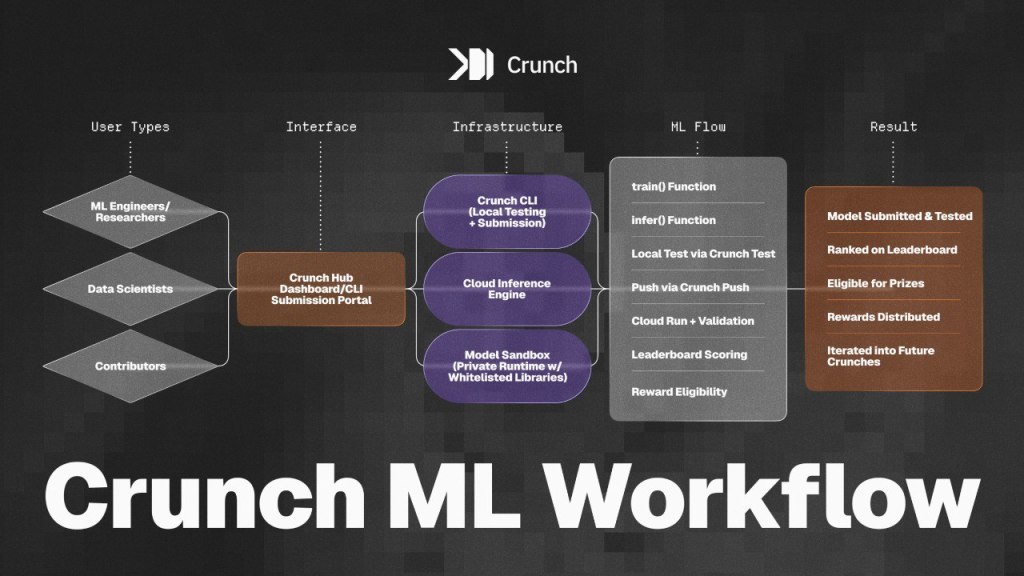
Crunch is a platform built for machine learning engineers, data scientists, and quantitative researchers who want to turn their models into real-world impact and get rewarded for it. Whether you’re detecting structural breaks in financial time series or forecasting equity movements, Crunch provides the tools, infrastructure, and incentives to test your models in production-grade environments.
In this guide, we’ll walk you through the Crunch model flow: from setting up your environment to deploying your first submission. If you’ve ever wanted to compete with the best (or simply evaluate your models in a secure and reproducible setting), this is your starting point.
Prerequisites
Before you begin, make sure you have:
- A CrunchDAO account
- Python 3.8+ and
pipinstalled - Basic knowledge of Jupyter Notebooks or Python
- Familiarity with CLI-based workflows
Step 1: Sign Up for Crunch Lab
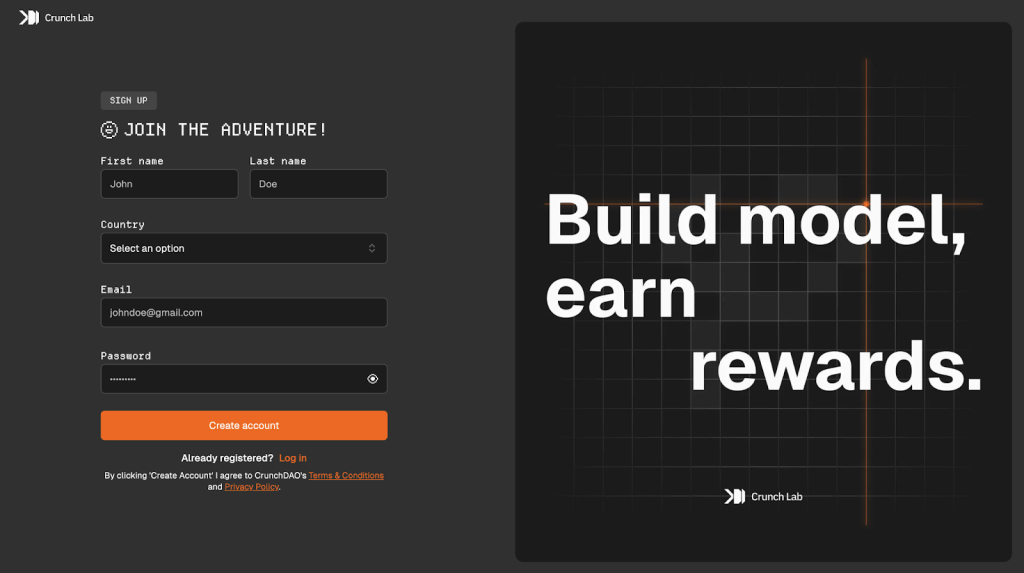
Before you submit your first model or earn leaderboard rewards, you’ll need a Crunch account.
Here’s how to join:
- Go to hub.crunchdao.com/signup
- Fill in your details
- Enter a valid email
- Choose a secure password
- Click the bright orange “Create Account” button
You’ll then be prompted to verify your email. Once done, you’re officially part of the Crunch Lab community.
Step 2: Set Up Your Crunch Profile

Once you’ve signed up and logged in, the next step is to personalize your Crunch profile and start tracking your contributions.
How to Edit Your Profile
- Click on your username in the top left (e.g.,
giant-manisha) - Click the orange “Edit Informations” button
- Update your country, display name, or avatar, wallet address etc.
- Your profile now reflects your identity in the Crunch community
Step 3: Choose an Active Competition
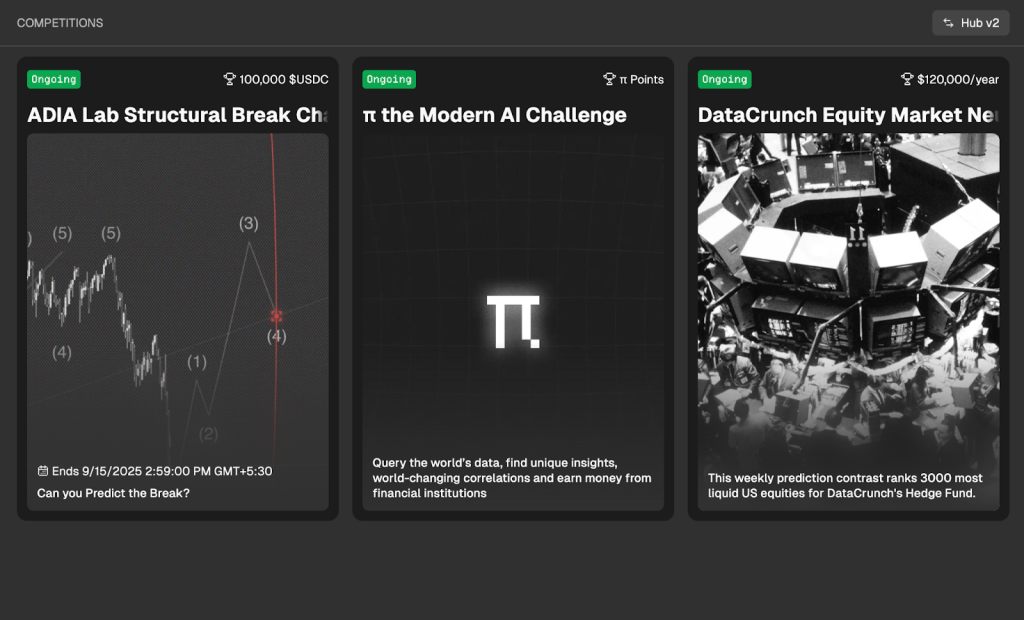
Once your profile and wallet are set, it’s time to join your first Crunch. From your dashboard, head to the Competitions tab to browse all ongoing challenges. Each Crunch comes with its own dataset, submission format, and reward structure.
Current active competitions:
- ADIA Lab Structural Break Challenge
- Datacrunch Equity Market Neutral Challenge
- π the Modern AI Challenge
Just click into a Crunch you want to compete for. For the purpose of this blog we shall look into our latest $100k challenge on structural breaks.
Step 4: Explore the Structural Break Challenge & Submission Setup

Once you’ve picked your competition, head to its Overview tab to understand the challenge in depth. In the ADIA Lab Structural Break Challenge, you’re working with univariate time series data. At a specific point in the sequence, a structural break may have occurred—your task is to build a model that can detect it. This is a real-world problem tied to high-value forecasting, and it comes with a $100,000 USDC prize pool. You can join solo or as part of a team (up to 5 members), though only the team leader will appear on the leaderboard.
When you’re ready, go to the Submit tab. Here, you’ll find three options for how to upload your work:
- Submit a Notebook (.
ipynb) — recommended for beginners and rapid prototyping - Submit via CLI — best for script-based workflows and version control
- Submit Files — for advanced use cases with manual file prep
You’ll also find:
- A ready-to-run command to install Crunch CLI and authenticate your notebook
- Quickstarter Notebooks — baseline models to help you understand the problem fast
- Links to the list of whitelisted libraries that are safe to use in the cloud runtime
- A shortcut to download the raw dataset directly
This section acts as your launchpad—setup, edit, test, and upload everything from one place. When you’re ready, you’ll upload your notebook or files, add a short description (optional), and prepare to submit.
Step 5: Submit Your First Model on Crunch
Once your model is ready, it’s time to submit and run it on Crunch’s cloud environment. In the Structural Break Challenge, you can either submit through the notebook interface or the CLI. If you’re just starting out, use the Quickstarter Notebook and follow these steps.
- Install the CLI inside your notebook
CSS%pip install crunch-cli --upgrade
- Authenticate and set up your project
Use the token command provided in the notebook to authenticate:
CSS!crunch setup structural-break my-model-name --notebook --token <your_token>
- Load your data
CSSimport crunchcrunch = crunch.load_notebook()X_train, y_train, X_test = crunch.load_data()
- Define your entry points
Your code must include a train() and infer() function.
These will be automatically detected and run by Crunch’s cloud runner.
- Test locally before submitting
Run:
CSScrunch.test()
This ensures your code is stable before burning compute.
- Download your
.ipynbnotebook
From Google Colab or Jupyter, download the notebook once it’s tested. - Submit via the web interface
Go to the Submit tab of the Structural Break Challenge, choose “Submit a Notebook,” and upload your file. Add an optional submission message and hit submit. - Choose your compute setup
Crunch automatically detects your package imports and recommends a CPU or GPU instance. You can override it, but it’s best to go with the default unless you’re sure. - Run in the cloud
After uploading, click Run in the Cloud. Crunch will simulate inference on test data, validate your predictions, and return logs. If successful, you’ll get a confirmation with your score.
Step 6: Track Your Score & Climb the Leaderboard
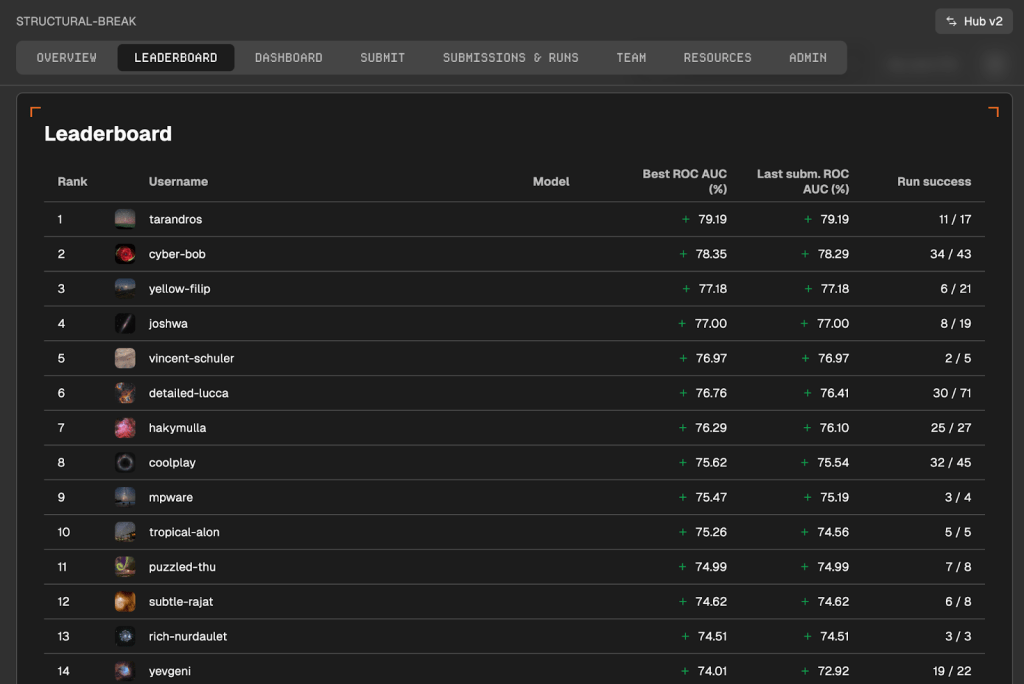
Once your model runs successfully in the cloud, Crunch will automatically score it and show you the results. Head over to the Leaderboard tab to view your submission’s performance. You’ll see your rank, score, run history, and eligibility for rewards. If your model isn’t showing up, double-check that it ran successfully and passed all deterministic and correlation checks.
Good news: you’re not limited to one shot. Crunch encourages iteration—submit as many models as you’d like, fine-tune your logic, and push your best ideas to the top. Each submission teaches you something new, and every improvement helps you climb higher.
Ready to start crunching?
Pick a challenge, run your first submission, and see how you rank. The leaderboard is live.
📽️ Prefer to watch instead? Check out our step-by-step video walkthrough and follow along as we take you through your first Crunch. Feel free to drop a message if you are stuck at some point and want assistance. The team loves to attend to the community questions.
 CrunchDAO